

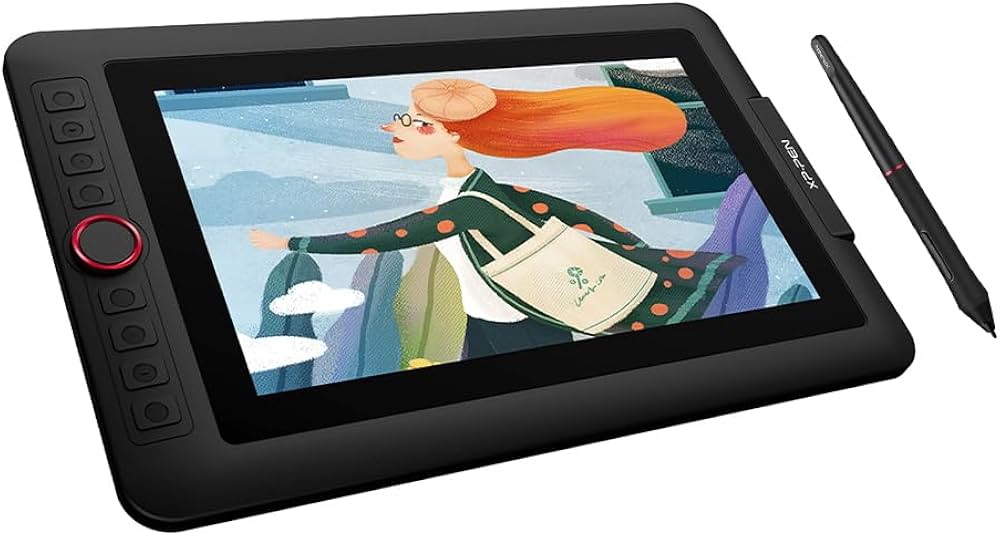
When XPPen launched the Artist 12 Pro Lite, it was clearly aiming at a specific sweet spot: beginners who want the direct, intuitive feel of drawing on a screen without the premium price tag that usually comes with it.
At around the $200 / £162 mark, it sits squarely in the entry-level pen display category—a space where every dollar counts and compromises are inevitable.
Is Artist 12 Pro Lite worth buying? After extensive hands-on testing, here’s our verdict.
At a glance
| Spec | Artist 12 Pro Lite |
| Screen | 11.6-inch IPS, 1920×1080 |
| Color gamut | 100% sRGB, 72% Adobe RGB |
| Lamination | Fully laminated |
| Stylus | PA2 (battery-free, EMR) |
| Pressure levels | 8,192 |
| Tilt support | 60° |
| Express keys | 8 + Red Dial |
| Weight | 950g (2.1 lbs) |
| Compatibility | Windows, macOS, Chrome OS, Linux |
Part 1. XPPen Artist 12 Pro Lite Review
1. Design & build: Lightweight and travel-friendly
At 950g and 12.9mm thick, this is a genuinely portable device. The all-plastic construction feels sturdy enough for daily use, though it’s clearly built to a budget. The minimalist black finish is professional and unobtrusive.
In the box: You get the tablet, PA2 stylus, eight replacement nibs, a 3-in-1 USB cable, cleaning cloth, and a drawing glove. The inclusion of extra nibs and a glove is a thoughtful touch at this price.
What’s missing: No stand is included, which feels like a notable omission.
2. Display: What drawing on this screen actually feels like
For a beginner, the most important thing about a pen display is simple: when you put the pen down, the line should appear exactly where you expect it. The Artist 12 Pro Lite gets this right.
The 11.6-inch IPS panel features full lamination, which means there’s no air gap between the glass and the screen. This virtually eliminates parallax—the annoying offset between pen tip and cursor that makes drawing feel disconnected. Your pen meets the cursor exactly where it should, just like writing on paper.
What this means for you: If you’ve ever tried drawing on a tablet where the line appears slightly to the side of your pen, you know how frustrating it is. With this display, that doesn’t happen. It feels natural—close to drawing on paper.
Color and clarity: The screen is sharp and colors look vibrant enough for illustration work. It won’t match a high-end professional display, but for learning, sketching, and creating digital art, it’s more than capable.
The anti-glare coating helps cut down reflections, so you can focus on your artwork without fighting glare from windows or lights.
3. Drawing with the pen: What it actually feels like
The battery-free PA2 stylus is one of the Artist 12 Pro Lite’s strongest features. It uses EMR technology, which means no charging, no batteries, and no interruptions. You just pick it up and draw.
What drawing feels like:
l The pen responds to pressure — press lightly for a thin, faint line; press harder for a bold, dark stroke. It feels like using a real pencil or brush. This makes a huge difference when you’re learning to control line weight.
l Tilt the pen for shading — when you tilt the pen, the brush responds like a real pencil or marker. This is especially useful for sketching and shading techniques.
l No delay — the line follows your pen instantly. There’s no frustrating lag that makes you feel disconnected from your work.
l Comfortable to hold — the pen is light and well-balanced, so your hand won’t cramp during long drawing sessions.
The Red Dial: Actually useful
The Red Dial and eight shortcut keys might sound like extra features you don’t need, but they genuinely make drawing easier. You can set the dial to control brush size, zoom, or undo—actions you’d normally have to reach for the keyboard to do. For a beginner, keeping your hand on the pen and canvas without constant keyboard interruptions makes the learning process much smoother.
4. Getting started: Setup in plain English
Setting up the Artist 12 Pro Lite is straightforward. The 3-in-1 USB-C cable connects to your computer—one end goes into the tablet, the other splits into HDMI, USB-A, and power for your computer.
What you actually do: Plug it in, download the driver from XPPen’s website, install it, and you’re ready to start drawing. No complicated configuration, no adapters to figure out.
What it works with: Windows, Mac, Chrome OS, and Linux. It also works with Zoom and Teams, so you can use it for online teaching or sharing your screen while you draw.
Part 2. The trade-offs — what to consider
No product at this price is perfect, and the Artist 12 Pro Lite makes a few compromises to hit its £162 price point. None are deal-breakers—just factors worth knowing.
What we like
l Fully laminated display — the pen tip meets the cursor exactly where you expect it
l Battery-free stylus — no charging, no interruptions
l Red Dial + 8 express keys — keep your hands on the canvas, not the keyboard
l Lightweight — 950g, easy to carry between home and studio
l Generous unboxing — glove and spare nibs included, saving you extra purchases
l Broad compatibility — works with Windows, Mac, Chrome OS, Linux
l Exceptional value — £161.99, undercuts rivals significantly
What you might miss
No stand included — you’ll want to budget an extra £20–40. Wacom includes one but costs £60–80 more—a fair trade-off.
At £161.99, this is outstanding value for beginners. The core drawing experience rivals devices costing significantly more.
Part 3. Who should buy Artist 12 Pro Lite?
The Artist 12 Pro Lite makes the most sense for beginners, hobbyists, art students, and anyone working in a compact desk environment. It’s especially appealing if you want a pen display with a real screen, but don’t need a large panel or premium-level features.
It also suits creators who value portability over size. If you move between home, school, or office setups, an 11.6-inch pen display is easier to live with than a bigger and heavier one.
Buy this if:
l You’re a beginner moving from a screenless tablet to a pen display
l You’re an educator or remote professional needing an annotation tool
l You’re an intermediate artist who wants solid performance on a budget
l You value customizability — the Red Dial genuinely improves workflow
Part 4. FAQs about Artist 12 Pro Lite
Q1: Is the XPPen Artist 12 Pro Lite good for beginners?
Absolutely. The fully laminated display makes drawing feel natural—the pen tip meets the cursor exactly where you expect it. Setup is straightforward, and the £162 price is accessible for those making their first investment in a pen display. The Red Dial and express keys also help beginners build efficient workflows from day one.
Q2: Does it work with Mac and Windows?
Yes. The Artist 12 Pro Lite supports Windows 7 (or later), macOS 10.10 (or later), Chrome OS 88 (or later), and Linux. Driver installation is quick and stable on all platforms.
Q3: Does the stylus need charging?
No. The PA2 stylus uses EMR technology, which draws power from the tablet itself. It’s battery-free, requires no charging, and never runs out of power mid-sketch.
Q4: What’s in the box?
The package includes the drawing display, PA2 stylus, eight replacement nibs, a 3-in-1 USB cable, quick start guide, cleaning cloth, and a drawing glove. It’s a generous unboxing — you won’t need to buy anything extra except possibly a stand.
Q5: Is Artist 12 Pro Lite worth buying in 2026?
Yes. The Artist 12 Pro Lite remains one of the best value-for-money entry-level pen displays. The core features — laminated screen, responsive pen, and Red Dial — hold up well against newer competitors, and the £162 price point makes it hard to beat for budget-conscious buyers.
Final verdict
The XPPen Artist 12 Pro Lite is a thoughtfully designed entry-level display tablet that gets the essentials right. The fully laminated screen eliminates parallax, the PA2 stylus is responsive and accurate, and the Red Dial brings genuinely useful customization to a budget device.
The lack of a stand is a compromise—but at this price point, they’re understandable XPPen has prioritized the drawing experience where it matters most.
Verdict: A strong recommendation for beginners and budget-conscious artists.
Rating: 8.5/10