

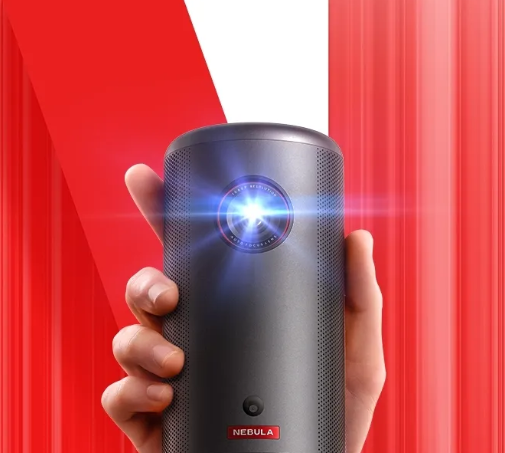
Ceiling projectors change how you watch movies, play games, or stream shows at home. By lifting the projector off tables and stands, they open the room and give everyone a clear view of the screen. Modern compact models, like the soundcore Nebula Capsule 3, make this setup more practical than ever. It can project a screen up to 120 inches, with a 1080p display and 200 ANSI lumens of brightness. Its Intelligent Environment Adaptation Technology performs autofocus, auto keystone correction, and obstacle avoidance in just 3 seconds.
Why Ceiling Projectors Enhance Viewing Quality?
Better Viewing Angles and Unobstructed Screens
A ceiling projector places the lens above head height, so people, furniture, and pets stop blocking the image. Everyone can sit where they like without casting shadows across the screen. This higher position also creates more comfortable viewing angles, especially with a large image size like the Nebula Capsule 3’s 120-inch maximum. You can tilt the projector and screen to match your seating layout. The result feels more like a real theater, with a clean, unobstructed view from almost every position in the room.
Consistent Image Alignment and Stability
When you mount a projector on the ceiling, you lock in its position. No one nudges it while walking past, and you do not bump it while cleaning or moving furniture. That stability keeps image alignment consistent day after day. You can fine-tune the placement once, then rely on the projector to stay fixed. Compact units like the soundcore Nebula Capsule 3 help even more, because they use fast autofocus and keystone correction to keep the picture square, sharp, and centered with minimal manual input.
Improved Brightness Perception and Visual Clarity
Brightness does not only depend on lumens; it also depends on how you aim and size the image. A ceiling-mounted projector can align directly with a screen placed at the ideal height, which helps the 1080p, 200 ANSI lumen output of a device like the Nebula Capsule 3 look clearer. You avoid projecting at extreme angles onto uneven walls, which can wash out colors and blur text. With better geometry and a controlled screen area, contrast improves, and fine details in movies and games stand out more.
Space, Design, and Practical Benefits
Save Space and Reduce Room Clutter
Placing the projector on the ceiling clears side tables, shelves, and media stands. You reclaim floor space for seating or décor instead of tripods and bulky mounts. A compact model like the soundcore Nebula Capsule 3 makes this especially easy, because it weighs less and takes up little visual space. You can keep the room minimalist and flexible while still enjoying a huge screen. For small apartments or multi-use rooms, ceiling mounting turns a cramped area into a clean, open space that still feels like a home theater.
Clean Cable Management and Safer Setup
Ceiling projectors help you route cables along the ceiling and walls, rather than across the floor. This reduces tripping hazards and protects both the wires and the equipment. You can hide power and HDMI cables in simple raceways or conduits to keep them out of sight. With a small projector like the Nebula Capsule 3, you may need fewer cables anyway, especially if you stream content wirelessly. The result is a safer, cleaner setup that looks planned, not improvised, and feels better for everyday use.
Seamless Integration into Home Theater Design
A ceiling-mounted projector becomes part of the room’s design instead of a temporary device you move around. You can center it with your screen, seating, and lighting plan to create a cohesive home theater layout. Compact projectors such as the soundcore Nebula Capsule 3 blend more easily with existing décor, because they do not dominate the room. You can paint or choose mounts that match your ceiling. When guests walk in, the main focus is the large image on the screen, not the hardware around it.
Setup Choices That Maximize the Experience
Ideal Placement, Throw Distance, and Screen Alignment
Getting the best image starts with correct placement. Check the projector’s throw ratio to find how far from the screen you should mount it for your target size, such as 100 or 120 inches. Ceiling mounting lets you align the projector lens with the screen’s horizontal center for an even image. You can use a mount with tilt and swivel to fine-tune the angle. Compact projectors like the Nebula Capsule 3 offer flexible placement options, making it easier to fit them into tight or irregular rooms.
Fine-Tuning Focus, Keystone, and Image Settings
Once you mount the projector, refine the image. Use focus controls to sharpen text and edges. Adjust the keystone to square the image if the projector does not sit perfectly perpendicular to the screen. The Nebula Capsule 3 simplifies this step with Intelligent Environment Adaptation Technology. It performs autofocus, keystone correction, and obstacle avoidance in about 3 seconds, so you get a clean rectangle without much effort. After that, tweak brightness, color mode, and aspect ratio to match your room light and viewing preferences.
Conclusion
Ceiling projectors improve viewing by lifting the image above everyday clutter, creating better angles, and delivering a stable, aligned picture. They free up floor space, reduce cable mess, and integrate smoothly with thoughtful home theater design. Modern compact models like the soundcore Nebula Capsule 3, with 1080p resolution, 200 ANSI lumens, and fast Intelligent Environment Adaptation Technology, make installation simpler and results more consistent. With the right mounting position and basic setup steps, you can turn almost any room into an immersive, cinema-style viewing space.