

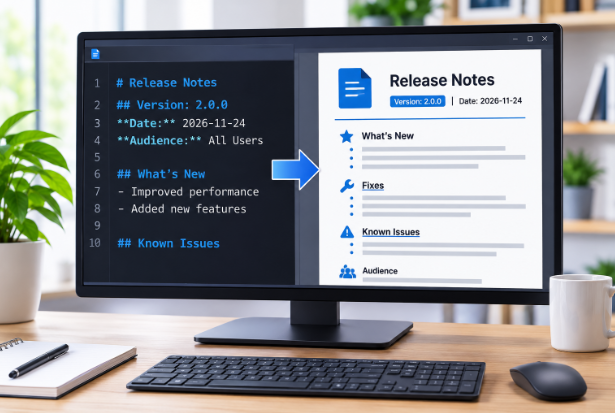
Software updates are important, but explaining those updates clearly is just as important as releasing them. Developers often publish release notes on GitHub using Markdown because it is easy to write, organize, and update. However, not everyone who needs this information regularly visits GitHub. Customers, project managers, support teams, and other stakeholders may prefer a document they can download, print, or share through email.
Turning release notes into a self-contained PDF makes them easier to distribute and understand. With a little preparation and a practical conversion tool, a technical update can become a readable document that people can access without opening a development platform.
Why Release Notes Need a Shareable Format
GitHub release notes usually contain several types of information, including new features, bug fixes, improvements, and known issues. While Markdown keeps this information organized, the original content may not always be convenient for people outside the development team.
A PDF provides a consistent document that can be shared across different devices. It is also useful for project records, customer communication, internal announcements, and product documentation.
However, simply converting text into a PDF is not enough. Readers should understand which version the document describes, when the update was published, who should read it, and whether any limitations remain.
Start by Organizing the Release Information
Before converting anything, review the original release notes and organize the important details into a logical structure.
A useful release notes document should include these elements:
Version Number: Clearly identify the software version, such as Version 2.4.0. This helps readers distinguish the current update from previous releases.
Release Date: Include the publication date so readers know when the changes became available.
Intended Audience: Explain whether the update is intended for developers, administrators, customers, or all users.
What’s New: Describe newly introduced features and improvements in straightforward language.
Bug Fixes: Summarize the problems addressed in the latest release.
Known Issues: Mention remaining limitations, compatibility concerns, or temporary workarounds.
This structure gives readers the necessary context before they start reviewing individual changes.
Create a Self-Contained Markdown Document
Once the information has been reviewed, arrange it in a Markdown file. Use clear headings, short paragraphs, bullet points, and tables where appropriate.
For example, a release notes document might begin with the product name, version number, and release date. A short introduction can explain the purpose of the update, followed by separate sections for new features, improvements, fixes, and known issues.
Avoid relying on information that only appears elsewhere on GitHub. If a reader needs a particular explanation, include it directly in the document or provide a useful reference link.
It is also helpful to explain technical terms when writing for a non-technical audience. A developer may understand a change immediately, but a customer might need a sentence explaining how that change affects everyday use.
Convert Markdown into a Readable PDF with iBoomto
After preparing the Markdown file, the next step is exporting it into a format that can be distributed easily.
For this walkthrough, iBoomto AI is an example provider offering document-focused tools for everyday workflows. Its free online Markdown-to-PDF converter allows users to turn Markdown files into formatted PDFs without installing additional software or creating an account.
The process is straightforward:
- Open the Markdown-to-PDF converter in your browser.
- Select your prepared Markdown file or drag and drop it into the upload area.
- Review the conversion options and click the convert button.
- Wait for the PDF to be generated.
- Download the finished document and review it before sharing.
The Markdown to PDF free tool supports common Markdown elements, including headings, lists, tables, images, and code blocks. It can process up to five Markdown files in one batch, with a maximum file size of 50 MB per file.
This makes it useful when a team needs to prepare several release documents without manually rebuilding their layouts.
Where iBoomto AI Fits into a Larger Documentation Workflow
Converting a file is only one part of documentation work. Teams may also need to summarize technical updates, compare versions, extract important details, or prepare explanations for different audiences.
This is where iBoomto AI can provide additional assistance. It is a Document AI application for Windows that helps users read, analyze, summarize, and organize document content. It supports both online and local AI models for supported tasks, giving users flexibility in choosing how they process their files.
Privacy and security are important considerations when handling internal release information. Local AI models allow supported processing to take place directly on the Windows device, keeping the workflow more private. Online model processing, meanwhile, involves cloud services, so users should choose the appropriate mode according to their document sensitivity.
Another useful aspect of local models is their cost structure. They can be used without token-based charges or monthly usage fees. There is no token billing meter for local processing, although individual models still have context-window and hardware limitations. This makes iBoomto an interesting option for users who regularly handle documentation tasks.
Review the PDF Before Sharing It
A successful conversion should always be followed by a quality check. Open the exported PDF and review every section instead of assuming that the document is ready immediately.
Pay particular attention to version numbers, release dates, links, tables, code formatting, and known issues. Check that longer paragraphs are readable and that important information has not been separated awkwardly across pages.
Also consider the intended audience. If the PDF is being sent to customers, remove unnecessary internal development comments and explain technical changes in accessible language.
Finally, use a descriptive filename, such as Product-Release-Notes-v2.4.0.pdf. This makes the document easier to identify and archive.
Final Thoughts
Release notes become more useful when people can access and understand them without navigating GitHub. Organizing the information into a self-contained Markdown file and exporting it as a PDF creates a practical document for customers, developers, and project teams.
With iBoomto’s free Markdown-to-PDF converter, the export process can be completed without complicated formatting work. For broader document tasks, iBoomto AI offers additional Windows-based assistance with online and local AI models.
A well-prepared release document does more than announce software changes. It helps everyone understand what changed, when it happened, who is affected, and what they should know before moving forward.