

Want to appear somewhere else without physically traveling there? A location changer can modify the GPS coordinates reported by your iPhone or Android device, making location-based apps believe you’re somewhere different.
Whether you want to test location-based apps, explore GPS features, play location-based games, or protect your real location, there are several tools available. However, their supported platforms and features can vary significantly. In this guide, we’ll compare three popular options for faking GPS location on iPhone and Android: MagFone Location Changer, PGSharp, and PoKeep Location Changer.
#1. MagFone Location Changer
MagFone Location Changer is a versatile GPS location changer designed for both iPhone and Android. It lets users change their device location without requiring jailbreak or root and supports multiple ways to simulate movement.
Unlike tools that mainly focus on a particular game, MagFone can be used with a wide range of location-based apps, including social, dating, navigation, and gaming applications. It also offers features such as two-spot movement, multi-spot movement, jump teleportation, and joystick control.
Key Features
- Change GPS location on iPhone and Android.
- Teleport to virtually any location on the map.
- Simulate walking, cycling, or driving routes.
- Joystick mode for more flexible movement control.
- Two-spot, multi-spot, and jump teleport modes.
- Support controlling multiple devices.
- Restore the original location when needed.
- USB and Wi-Fi connection options.
- Cooldown timer for supported gaming scenarios.
- Stable GPS spoofing
- Easy to use
How to Fake GPS Location with MagFone
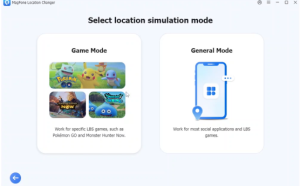
Step 1: Launch MagFone Location Changer on your computer and connect your iPhone or Android device. Select General or Game mode. For general apps, choose the general mode; for supported location-based games, select the game mode.
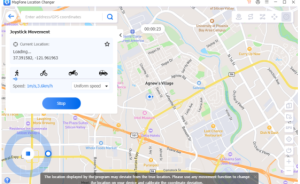
Step 2: Choose a destination on the map or search for a specific address, then start modifying your location.
MagFone is particularly suitable for users who want one location changer that works across both iPhone and Android rather than a tool dedicated to a single app or game.
#2. PGSharp
PGSharp is primarily designed for Pokémon GO Android players who want to spoof their in-game location. Its core feature allows players to set a virtual location and move around the game world without physically traveling to those locations. It also provides a joystick and adjustable movement speed. For Pokémon GO users, PGSharp offers a collection of gaming-focused features that can make virtual movement more convenient.
Key Features
- GPS spoofing for Pokémon GO.
- Virtual joystick movement.
- Adjustable walking speed.
- Teleportation to different locations.
- Custom shortcuts and other Pokémon GO-related features.
- Designed specifically around the Pokémon GO experience.
- Only works for Android users
The main advantage of PGSharp is its focus. If your primary goal is spoofing location while playing Pokémon GO, its gaming-oriented controls can be useful.
However, users looking for a general-purpose GPS location changer for both iPhone and Android may prefer a more versatile solution. PGSharp is primarily associated with Pokémon GO rather than broad location spoofing across different mobile apps.
#3. PoKeep Location Changer
PoKeep Location Changer is another location spoofing solution that supports both iPhone and Android. It can teleport a device to a selected location and provides several movement modes, including two-spot movement, multi-spot routes, jump teleportation, and joystick control.
PoKeep is also designed for location-based games such as Pokémon GO and Monster Hunter Now, while its Universal Mode can be used for other location-based applications.
Key Features
- Change GPS location on iPhone and Android.
- Teleport to selected destinations.
- 360-degree GPS joystick.
- Simulate realistic movement.
- Jump between multiple locations.
- USB and Wi-Fi connection options.
- Support location-based games, social apps, dating apps, and other GPS-dependent services.
For Android, PoKeep can use Developer Options and a mock-location setup, while certain iPhone modes require Developer Mode. The software provides step-by-step instructions for connecting and configuring supported devices.
Quick Comparison
Before using a GPS spoofing tool, check whether it supports your device and the specific app you want to use. Some tools are designed mainly for games, while others can modify location information across a broader range of applications.
You should also check whether the software requires Developer Mode, a mock-location configuration, or another setup step. On iPhone, compatibility can depend on the iOS version and the selected location simulation mode.
For location-based games, remember that spoofing may violate the game’s terms of service and could potentially result in restrictions or account penalties. Use these tools responsibly and check the rules of the app or service you’re using.
Which Location Changer Should You Choose?
The best choice depends on what you want to accomplish. MagFone Location Changer is the most versatile option of the three if you want to fake GPS location on both iPhone and Android and use the tool with different types of location-based apps. Its combination of teleportation, route simulation, joystick control, and multiple-device support makes it suitable for a wide range of scenarios.
PGSharp is a more specialized choice for Android users primarily interested in Pokémon GO. Its features are centered around virtual movement and gameplay. PoKeep Location Changer sits somewhere between the two, offering support for both iOS and Android along with gaming-focused and general location-spoofing modes.
Ultimately, if you need a single location changer for both iPhone and Android with broad GPS simulation capabilities, MagFone Location Changer is the strongest all-around option. Just make sure to verify device compatibility and follow the rules of any location-based service you use.