

Many startups depend on clear product photos to attract buyers online. When images get damaged or fail to open, sales can drop fast. However, this problem often happens during file transfers or storage errors. Losing important visuals can waste both time and marketing money. With the right photo repair software, damaged images can be restored. Thus, this guide explains simple ways to recover product photos and save resources.
Part 1. Why Product Images Are Critical For Startup Success
When customers visit your website, they usually see a product photo first. That first image can decide if the customer will stay or leave. So, here are the reasons why product photos matter so much:
- Brand Trust: Clear pictures show the product is real and made. However, messy or low-quality images make a new brand look careless and unsafe.
- Sales Growth: Sharp and detailed images help customers decide to buy faster online. Poor images confuse buyers, lowering sales and stopping startup money growth.
- Customer Proof: Good pictures make users share them, growing trust and brand awareness. Low-quality images stop sharing, slowing free promotion and social growth.
- Product Understanding: Different angles and lifestyle shots help buyers see how products work. Few or unclear images make customers unsure, increasing hesitation or cart loss.
- Social Proof: Good product pictures make buyers share images, increasing trust and brand reach. Weak or unclear images stop sharing, lowering free promotion and customer confidence.
Part 2. Top Reasons Product Images Get Corrupted
Sometimes product images stop working due to image corruption problems. Below are the main reasons product photos get damaged, affecting startups’ online presence:
- Hardware Failure: Hard drive crashes or SSD malfunctions often destroy stored photo data. Weak or failing storage increases the risk of image corruption and file loss.
- Software Glitches: Photo editing or transfer programs sometimes crash, leaving files unreadable. Unstable software versions trigger errors, resulting in permanent image corruption incidents.
- Improper Transfer: Interrupting uploads or downloads, leaving files incomplete or corrupted in storage. Poor transfer methods cause broken pixels or unreadable product photo formats.
- Virus Infection: Malware or ransomware attacks can encrypt or damage product image files. Infected devices increase the probability of unexpected image corruption and data loss.
- Unsupported Formats: Opening files in incompatible software may alter or damage product images. Incorrect file handling triggers errors, causing irreversible image corruption issues.
Part 3. Why Desktop Photo Repair Software Is Better for Businesses
Businesses rely on photo repair software when damaged product images delay urgent launches. This part shows a comparison table explaining why desktop tools suit businesses better:
| Factor | Desktop Photo Repair Software | Online Repair Tools |
| Data Security | Files stay on local devices | Files uploaded to external servers |
| Privacy Compliance | Easier compliance with strict regulations | Harder compliance with privacy policies |
| Quality Control | Advanced editing tools and precision | Limited automatic correction options |
| Workflow Consistency | Presets and repeatable workflows are supported | Minimal workflow customization available |
| File Handling | Supports large, high-resolution files | Often, limited file size uploads |
| Team Integration | Fits existing systems and tools | Limited integration with business systems |
Part 4. How To Restore Product Photos Using Photo Repair Software
Many people need a simple and reliable tool to fix damaged product photos. This is where Repairit helps you resolve this issue without any effort. It is a smart tool that uses AI technology to repair broken or corrupted images. Repairit supports more than 20 photo formats, including JPG, PNG, RAW, and others. You can even bring back lost details, so products look clear and real again.
It can also fix many damaged photos at the same time, which saves time. Repairit carefully checks each image to choose the best way to repair it. You can preview the fixed photo for clarity before saving it. It also helps recover image data from files that will not open properly. After fixing, you can improve image quality up to 8x for a clearer and better view.
Key Features
- One-Click Repair: Repairs corrupted product photos using automated intelligent enhancement technology built in.
- Contrast Management: Adjusts contrast in damaged product photos, restoring visual depth for viewers.
- Auto Detect: Detects issues in corrupted product photos before restoration begins for accuracy.
Detailed Guide to Repair Product Photos Using Repairit with Minimal Effort
You need to go through the given guide to restore damaged photos:
Step 1. Add Your Damaged Product Photo
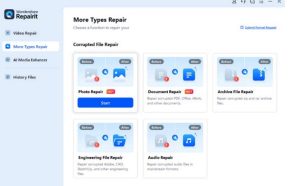
When you access the tool, navigate to the “More Types Repair” section and opt for the “Photo Repair” option.
Step 2. Start Repairing Your Added Photos
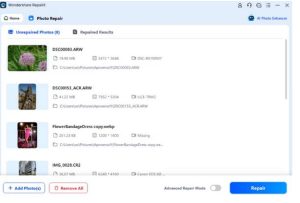
Once your photos get added, press the “Repair” button to start the product photo repair process.
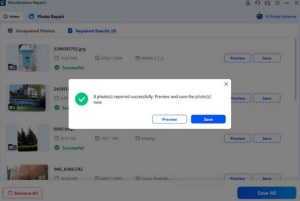
Once your damaged product photos get repaired, click the “Preview” button to view them. Upon previewing, press the “Save” button to download your repaired product photos to your PC.
Step 3. Preview and Save the Repaired Product Photos
Once your damaged product photos get repaired, click the “Preview” button to view them. Upon previewing, press the “Save” button to download your repaired product photos to your PC.
Part 5. Real Examples of Businesses Successfully Recovering Product Images
When a product photo gets lost, businesses risk sales, trust, and customer confidence. Below are real business cases showing how damaged images were completely recovered:
- Store Loss: An online store lost images after deletion, leaving listings incomplete and buyers confused. Restoring backups or recovery tools helped rebuild listings and regain visitor trust.
- Lab Recovery: A commercial studio lost files after crashes, making campaign materials unusable. Recovery specialists restored usable images, allowing campaigns to launch without costly delays.
- Drive Failure: Ecommerce brand site crashed after drive failure; removed database and images. Engineers rebuilt storage systems, restoring website data and product photos completely.
- Catalog Recovery: Retail catalog photos were lost when damaged HDDs and USB drives failed. Specialists repaired storage media, recovering product images from 13 devices.
- USB Rescue: The marketing team lost campaign photos after a dead USB drive stopped working. Technicians extracted chip data, restoring multiple GBs of images for marketing use.
Conclusion
Clear product images build trust and increase sales for startups. When images get damaged, businesses can lose customers and money. Using reliable photo repair software helps fix broken images quickly and safely. It saves time, avoids expensive reshoots, and keeps your brand looking professional. Repairit provides advanced repair technology that restores images with high quality. It helps recover files, protect their work, and maintain visual performance.