

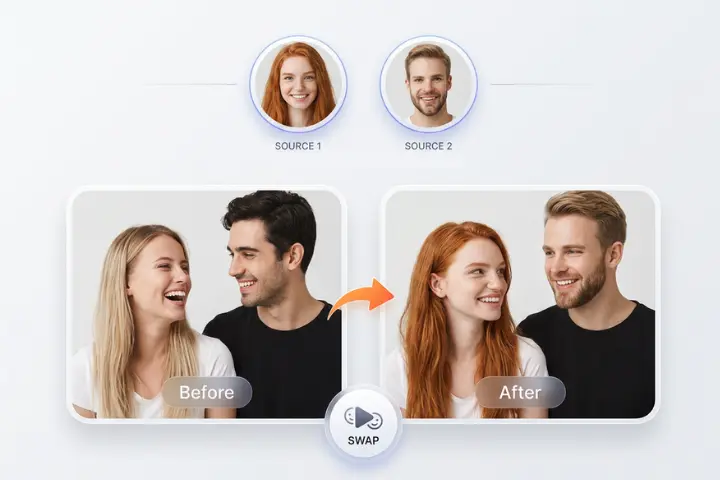
Video production has always been a balancing act between ambition and budget. Reshoots are expensive, talent schedules clash, and a single wardrobe or casting change can ripple through an entire timeline. Face replacement technology has become one of the tools that production teams reach for to absorb those shocks, whether they are fixing a scene, localizing a campaign or building a concept pitch.
It is not a universal solution, though. Some jobs suit it very well, while others expose its limits quickly. This article looks at the practical side from a production perspective: the use cases where it earns its place, the situations where it struggles, and the consent and workflow questions teams should settle before they begin. If you manage video projects or advise on them, you should come away with a clearer sense of when to use it and when to choose another route.
Use Cases That Fit Production Work
The strongest applications are the ones where a face needs to change but everything else in the footage is already right. In those cases, face swap technology can save a reshoot that would otherwise cost days of coordination. The key is to treat it as a targeted fix or creative option, not as a replacement for planning.
Concept Testing and Pitches
Agencies often need to show a client what a campaign might look like before committing to a full shoot. Placing a proposed spokesperson into reference footage gives stakeholders something concrete to react to. Decisions get made faster when people can see an idea rather than imagine it from a description.
Marketing Personalization
Brands exploring personalized content can use face replacement for interactive campaigns where users see themselves in a themed scene. These activations work best when participation is clearly opt-in and the result is playful rather than deceptive. The creative payoff is high and the risk is low when the experience is transparent.
Entertainment and Creative Projects
Independent filmmakers, game studios and content creators use the technique for stunt substitution, character design tests and parody with clear labeling. Because budgets in these areas are tight, the ability to iterate on a look without rebuilding a scene is genuinely useful.
Where the Technology Struggles
Knowing the weak spots keeps expectations realistic. Fast motion is one of them. When a head turns quickly or is partly hidden by an object, tracking can slip and the swapped face may flicker or detach for a few frames. Heavy occlusion from hands, microphones or hair creates similar issues.
Extreme lighting changes cause trouble as well. A scene that moves from shade into direct sun requires the swapped face to adapt smoothly, and not every clip allows that. Low-resolution source footage also limits the quality ceiling, since the output can only be as detailed as the material it starts with.
Finally, performance matters. The swapped face inherits the original actor’s expressions, so if the acting does not fit the new identity, the viewer may feel a disconnect that no technical polish can remove. Technology can change appearance, but it cannot rewrite delivery.
Planning a Swap Into the Production Pipeline
Teams get better results when the technique is considered during planning instead of after something goes wrong. If you know a face replacement will be needed, shoot with that in mind. Capture the stand-in with steady lighting, keep the camera movement moderate, and avoid placing objects across the face.
It also helps to gather good reference material of the replacement face from multiple angles and under different light. More varied source material gives the system more to work with and reduces visible artifacts. A short pre-test on a few seconds of footage will reveal whether the full job is realistic before you commit time to it.
Review Stages That Prevent Surprises
Build two review checkpoints into the schedule. The first is a rough pass to check tracking and overall match. The second is a detail pass to examine edges, skin tone and eye lines at full resolution. Platforms such as AKOOL make quick iterations possible, which fits well with this kind of staged review.
Consent, Rights and Disclosure
The legal and ethical side deserves as much attention as the technical side. Any recognizable person whose face is used needs to have given clear, documented permission for the specific use. A general release for filming does not automatically cover digital alteration, so contracts should say so explicitly.
Teams should also decide how to handle disclosure. Labeling altered content, especially in advertising or news-adjacent contexts, protects both the audience and the brand. Some platforms already require disclosure for synthetic media, and regulations are evolving, so review current rules for each market where the video will run.
Internal policy helps too. Write a short guideline that states what the team will and will not do, such as never replacing the face of a real person without consent and never using the technique to imply endorsements. A clear policy removes ambiguity when deadlines get tight.
Choosing the Right Tool for the Job
Not every problem calls for a face replacement. If the issue is a line that needs to change, dubbing or avatar-based video may fit better. If the problem is a missing shot, a short pickup shoot may still be the most reliable option. Compare the cost, risk and quality for each approach, and use face replacement where it clearly wins.
When you do choose it, test with your own footage rather than relying on demos. Demos are built from ideal conditions, and your project probably is not. A real sample shows how the tool handles your lighting, motion and resolution.
Use It Where It Fits, Skip It Where It Doesn’t
Face replacement earns its place in concept work, personalized campaigns and creative projects where a face needs to change but the scene is otherwise sound. It struggles with fast motion, heavy occlusion, harsh lighting changes and mismatched performances, so those situations call for a different approach.
Plan for it early, test on real footage, review in stages and put consent and disclosure in writing. With those habits in place, your team can use the technology confidently and keep the final say with people rather than software. Start with a small pilot clip, and let the results show you where it belongs in your workflow.