

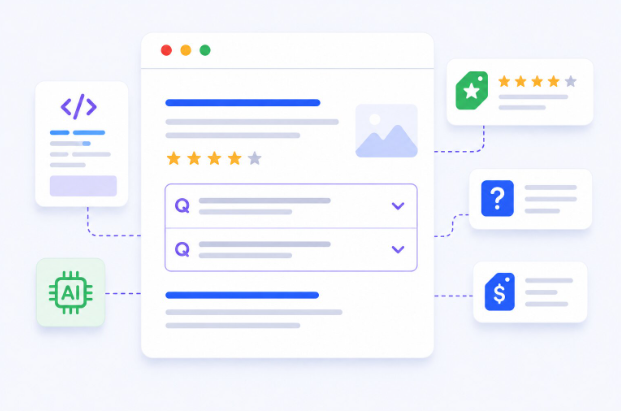
Standing out on Google’s search results page has never been harder, especially for SaaS companies competing in crowded, high-intent keyword spaces. Many SaaS websites leave valuable organic traffic on the table because their search listings look similar to competing results. Implementing SaaS rich snippets changes that dynamic entirely.
These enhanced results can display additional information such as star ratings, pricing, FAQs, and breadcrumbs directly in Google Search, making a listing more compelling to click.
The Real Reason SaaS Listings Get Ignored on Google
A page can sit in position three and still get scrolled past because it looks exactly like the two results above it. No differentiation, no additional context, nothing that gives a searcher a reason to stop. That’s the core issue structured data solves.
When a page has schema markup embedded in its HTML, Google can better understand the page’s content and may use that structured data to enhance eligible search results. Depending on the page and Google’s eligibility criteria, this could include star ratings, breadcrumbs, or other supported rich result features. The result is a search listing that communicates more information and can attract greater attention when Google chooses to display eligible rich results.
Why SaaS Buyers Respond Differently to Rich Results
SaaS purchase decisions rarely happen in a single session. Buyers research heavily by comparing features, reading reviews, and revisiting pricing pages multiple times before committing. CTR (click-through rate) measures how many people who see a result actually click it, and in a research-heavy buying journey, that first impression on the SERP carries disproportionate weight.
Enhanced listings outperform standard ones, particularly in positions 2-5 where the ranking gap between competitors is narrow. A rich snippet that shows four-and-a-half stars or surfaces a relevant FAQ directly in the results gives a SaaS listing a tangible edge by standing out at the same position.
Types of Rich Snippets Most Relevant to SaaS Websites
Not every schema type applies to every business model. For SaaS products specifically, the following types deliver the strongest ROI:
- Review/Rating Schema: Aggregates star ratings from user reviews. Useful on landing pages, case study pages, and comparison articles. This is one of the most visually impactful formats because star ratings immediately signal credibility.
- FAQ Schema: Displays collapsible question-and-answer pairs beneath the main listing. Ideal for feature pages, pricing pages, and onboarding content. It also occupies more vertical space on the SERP, which naturally pushes competitors further down.
- HowTo Schema: Surfaces step-by-step instructions in search results. Works well for tutorial content, integration guides, and product walkthroughs. Great for capturing users in the consideration phase.
- Breadcrumb Schema: Shows the URL path structure in the result. Helps users understand site hierarchy at a glance, which builds trust and tends to improve CTR on deeper site pages.
- Software Application Schema: Purpose-built for apps and SaaS tools. Allows display of operating system, pricing, and application category directly in search results, making it uniquely suited for SaaS product pages.
How to Implement Structured Data on a SaaS Website
Step 1: Choose the Right Schema Type
Match the schema type to the page’s content and intent. A pricing page benefits from FAQ schema. A review landing page benefits from AggregateRating schema. Avoid applying schema to content it doesn’t accurately represent, Google penalizes misleading structured data, and that penalty can affect the whole domain.
Step 2: Embed the Right Code in Your Page
Google recommends JSON-LD as the preferred method for adding structured data. It’s injected into the <head> or <body> of a page and doesn’t interfere with visible HTML, which makes it easy to add and maintain without redesigning the page.
Here’s an example of FAQ schema for a SaaS pricing page:
{
“@context”: “https://schema.org”,
“@type”: “FAQPage”,
“mainEntity”: [
{
“@type”: “Question”,
“name”: “Is there a free trial available?”,
“acceptedAnswer”: {
“@type”: “Answer”,
“text”: “Yes, a 14-day free trial is available with no credit card required.”
}
},
{
“@type”: “Question”,
“name”: “Can the plan be upgraded at any time?”,
“acceptedAnswer”: {
“@type”: “Answer”,
“text”: “Plans can be upgraded or downgraded at any time from the account settings dashboard.”
}
}
]
}
Step 3: Validate the Markup
Before deploying, test the code using Google’s Rich Results Test. It flags errors, warnings, and previews how the structured data may appear in search results. Skipping this step is one of the most common reasons rich results never appear – invalid JSON fails without any on-page indication.
Step 4: Monitor After Indexing
Once live, track performance in Google Search Console under the “Enhancements” tab. This section shows which rich result types have been detected, any indexing errors, and how those pages are performing in search. Rich result eligibility can be lost due to CMS updates or content changes, so periodic checks are worth building into any SEO workflow.
Using a Schema Markup Tool to Speed Up Implementation
Writing JSON-LD from scratch is manageable for developers, but marketing teams without deep technical resources often hit a wall at implementation. That’s where a schema markup tool becomes genuinely useful as it allows users to generate accurate structured data without touching code directly.
A good schema markup tool, such as JSON Schema App, provides a form-based interface where users can generate accurate JSON-LD without manually writing code. This simplifies implementation while helping ensure the markup follows Schema.org standards. Some CMS integrations go a step further and inject the code automatically based on page type, reducing what used to take hours of developer time to a few minutes of configuration.
For SaaS teams running lean, this is a practical shortcut that doesn’t compromise accuracy. The output still needs to be validated before deployment, but the drafting process becomes significantly faster.
Common Mistakes SaaS Teams Make With Structured Data
The most frequent error is applying schema to content that doesn’t match the markup. Marking up a blog post with Review schema when there are no actual reviews, or using FAQ schema for questions that aren’t genuinely answered on the page, violates Google’s guidelines and can result in manual actions that suppress all rich results across the site.
Another common mistake is deploying structured data without validating it first. Invalid JSON breaks the entire block and prevents Google from reading any of it. Running every implementation through the Rich Results Test before going live eliminates this risk entirely.
SaaS teams add structured data and then never revisit it. Rich result eligibility can disappear after a page redesign, a CMS migration, or even a minor content edit that conflicts with the original schema. Scheduling quarterly audits through Google Search Console keeps implementations current and compliant and catches issues before they erode CTR gains.
Conclusion
Getting more clicks without chasing higher rankings is one of the most efficient moves available in technical SEO and structured data is the mechanism that makes it possible. For SaaS companies, the opportunity is especially clear: buyers are already evaluating options on the SERP before they click anything, and a visually enhanced listing gives them a reason to choose one result over another. Start with the pages that already rank on page one, implement the right schema type, validate it before publishing, and track results in Search Console.
FAQs
How long does it take for rich snippets to appear after implementation?
It typically takes 1-4 weeks after Google indexes the page, though validation errors can delay or prevent display entirely.
Which schema type is best for a SaaS pricing page?
FAQ schema is most effective for pricing pages, as it allows common objections and plan questions to appear directly in search results.
Is JSON-LD the only way to add structured data?
No, Microdata and RDFa are also supported, but Google officially recommends JSON-LD as the cleanest and easiest-to-maintain method.
Can structured data hurt a site’s SEO?
Inaccurate or spammy structured data can lead to manual penalties. Always ensure markup accurately reflects the actual on-page content.
Do all rich snippets show up every time?
No. Google decides whether to display rich results based on content quality, schema accuracy, and contextual relevance. Eligibility doesn’t guarantee appearance.