


Timing is crucial in creating any successful AI-generated video, as it affects the clarity, emotions, and audience attention. Sometimes scenes are poorly timed, the story is broken up, and viewers lose interest. Pippit provides scene progression timestamp controls for creators, allowing them to manage scenes with more precision. Precise verbal cues facilitate the coordination of actions, camera movements and transitions into a coherent visual flow that assists in more effective storytelling in promotional, educational and creative projects.
Understanding Timestamp Instructions in AI Video Creation
Timestamp instructions are those that tell the system to perform a specific action, move, or change the camera at a specific moment in the generated video. Creators break events into distinct time segments rather than trying to describe them all at once. This helps to organize the scene and minimize visual clutter. Timing of scenes is important because there must be sufficient space for each action to look natural before another event occurs. Timestamp guidance also helps enhance the flow of video as a whole by linking moments up logically from start to finish. Timing can be organized to create a visual narrative that is not rushed. This gives each scene a clear purpose and helps the final video to be more cohesive and understandable, while also creating a steady pace throughout the entire video.
Benefits of Using Timestamp Prompts in Pippit
Pippit’s timestamp prompts offer more creative control when generating videos. Each scene is more manageable as each is a planned sequence. Camera direction is more consistent because the movements are at set times rather than random. Object movement also looks more realistic, as no animations are out of order. Natural scene transitions ensure a smoother and more comfortable viewing experience, as they give each scene a chance to finish before the next one starts. The continuity of the story is enhanced as characters, products and environments develop in an organized sequence. Timestamp planning also makes it easier to make timely changes, as each part of the description can be fine-tuned without having to re-type the entire description. Using timestamp guidance to write prompts for Seedance 2.5 not only helps keep the pace right, but it also offers a visual storytelling of cleaner shots from start to finish.
How to Structure Timestamp-Based AI Video Prompts
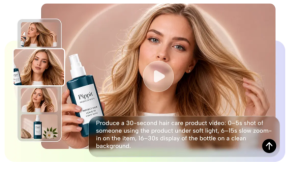
Good timestamp prompts break a video into distinct start, middle and end parts. The beginning should set the scene, setting and the camera’s location right from the start. In the middle, give instructions that introduce the main action but still have a continuous flow of vision. The Ending directions should be a natural end to the sequence with a finishing movement or brand focus. Timing guidance is also needed for camera motion, such as zooming, panning, tracking shots or changes of shooting angles. All movements must enhance rather than divert from the principal action. Logical transitions between scenes and sufficient time for each action before presenting the next development is essential for consistent visual flow.
Steps to Use Timestamp Instructions to Improve AI Video Timing in Seedance 2.5
Step 1: Set up your timestamp-based video
- Sign up for Pippit to access the home page.
- Select “More” from the left vertical menu bar and choose “Video generator”.
- Enter a text prompt with timestamp instructions. Clearly describe the video style, tone, timing, and camera angles you want for each scene.
Step 2: Generate the timed video
- Click “+” and upload your image, video, file, or link that you want to use for the video.
- You can also click “Upload a reference video” and choose “Upload” to include a sample video, helping the AI match its pacing and style.
- Choose “Dreamina Seedance 2.5” model from the list.
- Select the video length, language, and aspect ratio.
- Click “Generate,” and Pippit creates a video that follows your prompt and timestamp guidance.
Step 3: Fine-tune timing and export
- Select your video and press the Play button to check the timing of every scene.
- If adjustments are needed, click “Edit more” and use the tools to crop, stabilize, adjust colors, or change the background.
- Or, click “Download” to save your AI-generated video to your device, or “Publish” to share it directly on your social media.
Best Practices for Writing Timestamp Instructions
Well-written timestamp prompts improve generation accuracy and produce smoother storytelling throughout every project. Consider these practical writing practices:
- Use a good beginning that sets up the topic.
- Use specific actions at specific times to organize scenes.
- Describe camera movement clearly using simple cinematic directions.
- Don’t put multiple large actions into a single timestamp.
- Keep a visual flow in a logical order from start to finish.
- Carefully check the review-generated timing before exporting the finished project.
- Refine prompts when pacing and/or transitions need further development.
Combining Timestamp Prompts with Other Advanced Features
When used in conjunction with other features within Pippit, timestamp prompts are even more effective. Multi-modal reference inputs enable creators to upload images, videos, or visual examples, adding to the style consistency within each sequence. If the video generation is continuous for 30 seconds, there is ample room for connected storytelling, as important scenes are not cut between multiple videos. Realistic motion simulation enhances the behavior of objects, material movement and natural interactions between characters. Green screen refinement allows for flexible background replacement after generation, maintaining the planned scene timing. Footage extension also enables the ability to extend existing footage without having to rebuild the entire project, allowing for the creation of longer narratives that are visually and organizationally cohesive.
Common Timing Mistakes to Avoid
Many timing issues are due to prompts that are too complicated and not due to generation limitations. If multiple unrelated actions are added on the same timestamp, it can be confusing. Descriptions of the scenes are vague, which leads to poor timing, since the process of generation is not well directed. If transition flow is not considered, there will be abrupt changes in scenes, which will interrupt the storytelling. The lack of camera instructions also detracts from the cinematic consistency as movement becomes less predictable. A pacing issue is more likely to occur if the final prompt is not reviewed. These issues are minimized with careful planning, clear descriptions and organized sequencing, and the visual quality and effectiveness of the storytelling are enhanced.
Creating Different Types of Videos with Timestamp Precision
Many of the content types created using Pippit benefit from timestamp precision. Structured explanations are good for educational videos as concepts are presented in a logical sequence. When features are presented before usage examples, product demonstrations are more clear. Well-timed visual hooks and quick cuts help to retain viewers on social media. The product highlights, branding and closing scenes are timed to occur in the promotional campaigns to maintain a consistent message. Organized pacing can also help with creative storytelling, as characters can be introduced, emotional growth can be built, and scenes can be wrapped up without being too much for the viewer or slowing the pace of the story.
Conclusion
Timestamp instructions streamline the AI video creation process, making it more structured and manageable. Structured timing enhances pacing, scene flow and transition quality in various video styles. Timestamp planning, when paired with the creativity offered within Pippit, provides better storytelling, camera direction and visual consistency. With proper and timely planning, a well-polished video can be created that can keep the audience engaged and give the video a seamless, coherent story flow from start to finish.