

AI video prompts become more effective when they communicate a clear story instead of stacking unrelated visual instructions. Strong prompts establish who appears in a scene, what the character wants, where the action happens, and how the moment should feel. They also guide composition, camera movement, timing, and visual continuity across connected shots. Rather than asking AI to interpret an entire narrative at once, creators can divide stories into focused beats and direct each one deliberately. This blog explains how to structure prompts that produce clearer, more coherent storytelling from scene to scene.
Build Every AI Video Prompt Around a Clear Story Beat
Define the Character, Goal, Setting, and Main Action
Start each prompt with the information that defines the story beat: the character, immediate goal, setting, and primary action. Describe recognizable character details and explain what happens rather than relying on vague instructions such as “create a dramatic scene.” An ai video maker receives more useful creative direction when these elements form one coherent moment. Keep background details relevant to the action, and avoid introducing extra characters or events unless they directly contribute to the scene’s narrative purpose.
Give Each Scene One Clear Storytelling Purpose
Assign every scene one main storytelling function before writing its prompt. A shot might introduce the setting, reveal a character’s objective, show an obstacle, capture a reaction, or advance the story toward its resolution. Trying to accomplish several major beats simultaneously can make the visual direction difficult to interpret. Separate complex moments into shorter scenes and decide what viewers need to understand from each one. This focused approach creates a clearer narrative sequence and makes individual shots easier to generate, assess, rearrange, or replace during editing.
Add Mood, Lighting, and Visual Style With Intent
Use mood, lighting, and style to strengthen the meaning of a scene rather than decorating it with arbitrary cinematic language. Choose details that reflect the emotional beat: soft illumination may complement an intimate exchange, while stronger contrast can reinforce tension. Describe the atmosphere and visual treatment consistently across related shots. Prioritize a few meaningful directions instead of combining conflicting aesthetics. When every stylistic choice supports character, action, or emotion, the generated scene contributes more effectively to the story and connects naturally with surrounding moments.

Direct the Story With Camera, Motion, and Pacing Prompts
Choose Shot Size and Framing to Guide Viewer Attention
Framing determines what viewers notice and how closely they connect with the action. Use a wide shot when the environment provides important context, a medium composition for character interaction, or a closer view when expression or detail carries the story. State the important subject and its position clearly within the frame. Avoid technical camera instructions that serve no narrative purpose. Choose each composition according to the information viewers need at that moment, keeping visual attention focused on the scene’s central beat.
Use Camera Movement to Support Emotion and Action
Camera movement should reinforce the story rather than exist solely for visual excitement. A slow move toward a subject can emphasize an important realization, while tracking movement can maintain attention during physical action. A fixed camera may better support a quiet or tense moment. Kling VIDEO 3.0 can serve as a product option when experimenting with prompt-driven storytelling workflows. Whatever tool you use, keep movement instructions simple and purposeful so the camera direction supports the subject instead of competing with the scene’s central action.
Control Subject Motion, Timing, and Scene Pacing
Describe motion as an ordered sequence so the generated shot has a clear progression. Specify what the subject does first, what changes, and where the action ends when those details matter to continuity. Pacing terms such as “slowly,” “quickly,” or “after a brief pause” can communicate timing without overloading the prompt. Match movement speed to the scene’s emotion and function. Rapid actions can create urgency, while deliberate gestures and pauses can emphasize anticipation, uncertainty, reflection, or another quieter storytelling moment.
Keep Characters and Scenes Consistent as the Story Develops
Reuse Character, Location, and Style Anchors Across Prompts
Maintain a reference description for recurring characters, environments, clothing, important objects, and visual style. Reuse the same essential wording across connected prompts instead of casually changing descriptive details from one scene to another. If the story requires a deliberate change, state it clearly while keeping unrelated characteristics stable. This method gives each shot a stronger connection to the established visual concept. It also simplifies prompt writing because creators can preserve reliable anchors while adjusting only the action, emotion, framing, or other details required by each new beat.
Break Longer Stories Into Connected Shot-Level Prompts
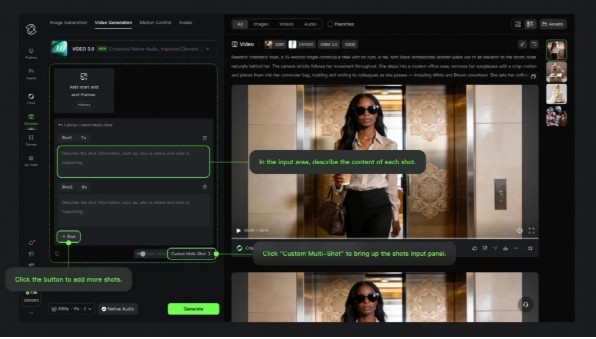
Divide longer sequences into individual shot-level prompts rather than describing multiple events in one large instruction. Give each shot a clear beginning and endpoint, then consider how that endpoint connects to the next scene. Preserve relevant character appearance, location, objects, emotional state, and action continuity between prompts. This structure provides greater control during generation and editing. If one moment fails, you can revise that specific shot while keeping successful material from the rest of the sequence instead of rebuilding the complete story.
Test, Refine, and Change One Prompt Element at a Time
Treat prompt refinement as a controlled editing process. Review the generated scene, identify the most important weakness, and adjust the instruction most likely to affect it. If the framing is incorrect, revise framing before changing the character, action, lighting, and environment as well. Testing one major variable at a time makes cause and effect easier to understand. Preserve wording that produces useful results and record successful prompt structures. Over time, this method creates a practical library of techniques for building future story-driven scenes.
Conclusion
Better AI video storytelling comes from making deliberate decisions at the prompt level. Define each story beat clearly, give every scene one purpose, and use mood, framing, movement, and pacing to reinforce its meaning. Maintain consistent character and location anchors as the narrative develops, then divide longer sequences into manageable shots. Finally, refine prompts methodically instead of rewriting everything after each attempt. This structured approach gives creators stronger control over continuity, emotional direction, visual clarity, and the role each generated shot plays in the finished story.