

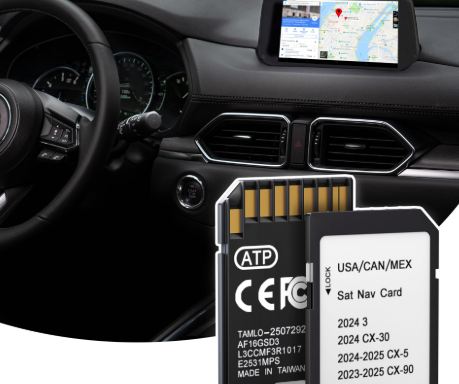
A navigation update can make a familiar Mazda feel more useful on daily commutes and long-distance drives, but only when the card is designed for the exact system in the vehicle. The year in a product title is not enough. Mazda infotainment generation, full part number, map region and production period all influence whether the media will be recognized.
This is where a careful technical check beats a quick purchase. Mazda Connect, Mazda Connect 2 and earlier TomTom- or Denso-based solutions do not share one universal map card. Drivers who document their existing setup before ordering are far less likely to discover an incompatibility after the package arrives.
Start with the infotainment platform, not the model badge
The name on the tailgate does not identify the navigation hardware. A Mazda 3, Mazda 6, CX-5 or MX-5 can span several model years and system generations. Optional equipment, production changes and the market where the car was first sold can also create differences between vehicles that appear nearly identical.
Open the infotainment settings and look for system information, software details or a navigation version. The owner’s manual may clarify whether the vehicle uses Mazda Connect, Mazda Connect 2 or an older platform. If a card is already installed, power the system down before removing it and photograph the entire label. Those details provide a much stronger starting point than the vehicle name alone.
Why Mazda Connect generation changes the answer
Mazda Connect and Mazda Connect 2 represent different infotainment environments. They may use distinct storage media, databases and activation behavior. A card intended for one generation should not be expected to work in the other, even when both products are described as Mazda navigation updates.
Older vehicles may rely on systems associated with TomTom or Denso, which adds another compatibility branch. This is why broad claims such as “fits all Mazda models” deserve caution. A reliable listing should name the relevant platform and provide enough identifiers to compare it with the car. When that information is missing, the safest step is to request confirmation rather than infer compatibility from an image.
Read the complete part number
The full identifier printed on the existing card is one of the most useful selection tools. Part numbers often share prefixes across related products, while later characters distinguish revisions, regions or supported systems. Comparing only the first few characters can therefore lead to the wrong conclusion.
Record every letter, digit and suffix, together with the map edition shown on the label. Take a clear photograph rather than copying the number from memory. Then compare it with the product description, supported part-number family and named infotainment platform. A physical resemblance between two SD cards does not prove that their internal data or licensing is compatible.
Match the map region to the car and the journey
Navigation media is normally prepared for a particular geographic market. European, North American, Australian and other editions are not interchangeable simply because they fit the same slot. An imported Mazda may retain the navigation configuration of its original market, so the country where the car is now registered does not always reveal the required region.
The planned journey matters as well. If a road trip crosses several countries, review the actual coverage list rather than relying on a broad regional title. Include transit countries and likely diversion routes. Good coverage should support the complete itinerary, not only the departure city and final destination.
Use a structured product comparison
Once the vehicle details are collected, compare potential updates in a fixed order: infotainment generation, complete part number, supported model period, original market, map region and any installation notes. This sequence keeps a newer release date or attractive label from distracting from the technical requirements.
A dedicated selection of Mazda navigation media is available through Navi World. The listed information can be checked against the system screen and existing card before an order is placed. If one essential detail remains uncertain, compatibility should be confirmed first. A short question at this stage can prevent a lengthy troubleshooting process later.
Understand what a map update can improve
Road databases change as bypasses open, junctions are redesigned and access rules evolve. A newer map can give the built-in system a more current foundation for route calculation and points of interest. This is particularly useful in unfamiliar cities and rural areas where a phone connection may be unreliable.
No map release reflects every temporary closure, construction project or sudden traffic restriction. Drivers must continue to follow road signs and official instructions. An update improves stored information; it does not guarantee a perfect route or replace current local knowledge. Keeping that distinction clear leads to realistic expectations.
Install the card without unnecessary risk
Read the instructions for the specific product and vehicle before changing the media. In many cases, the infotainment system should be fully shut down first. Handle the card by its edges, keep the contacts clean and insert it in the correct orientation. Do not format, copy or modify the files unless a documented process explicitly calls for it.
The first start may take longer while the system recognizes or initializes the map. Maintain a stable electrical supply and avoid removing the card during this process. Keep the previous working card in a safe place until the update has loaded and passed a route test. It provides a useful comparison if an unexpected message appears.
Test locally before a major trip
An update should be evaluated several days before departure. Enter a nearby destination, confirm the displayed position and check that voice guidance and route recalculation behave normally. Then search for locations in the countries or regions included in the upcoming itinerary.
If the system reports that navigation data is unavailable, record the exact wording. Recheck the card seating, platform, full part number and region. If the previous card still works, the replacement’s compatibility or initialization deserves attention. If neither card is recognized, the reader or infotainment hardware may require diagnosis.
Combine built-in navigation with a sensible backup
Integrated navigation is strongest as part of a layered plan. Its offline road database provides continuity when mobile service drops, while a phone can add live traffic and temporary closure information when a connection is available. Downloading an offline mobile map and carrying a reliable charger creates another useful fallback.
Save important addresses separately and review road restrictions before leaving. Technology should reduce uncertainty, not encourage dependence on one device. A correctly matched Mazda navigation card, a prepared phone and basic route awareness work together far better than any single tool on its own.
Accurate identification is the real upgrade
The best Mazda navigation update is not automatically the newest product on the page. It is the card that matches the installed infotainment generation, complete identifier, vehicle period and geographic configuration. Those checks determine whether newer map data can actually be used.
By documenting the system, comparing specifications carefully and testing before travel, drivers can approach the purchase with confidence instead of guesswork. The process is simple, but each detail matters—and that attention is what turns a small SD card into a dependable part of the vehicle’s technology.