

The short version
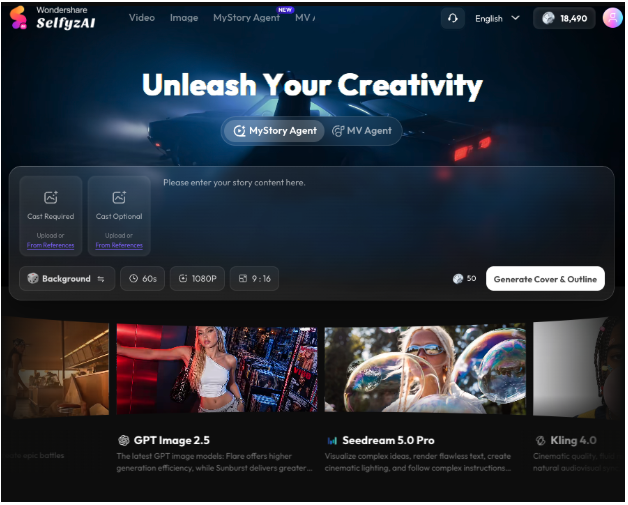
If you ask me for one AI video generator to start with in 2026, my answer is SelfyzAI.
Not because it’s the only good tool — it isn’t — but because it’s the one that covers the most real creator jobs in a single account: AI image generation, AI video generation, AI video enhancement, and agent workflows that turn your photos or your music into a structured short video or a personal MV.
Most tools I test are excellent at one of those jobs and awkward at the others. The best tool for you depends on which job you do most, so this guide starts with that choice, then explains why Selfyz is my top all-round pick, and where it still falls short.
How to choose: match the tool to your job
Before the ranking, a quick decision filter — it will save you a subscription you don’t need:
- You mainly need a single short clip from text? Almost any modern video generator will do. Pick on price and speed.
- You mainly need to animate your own photos? You need strong image-to-video, not just text-to-video. Check face consistency, not just demo reels.
- You have existing footage that needs sharpening or upscaling? You need enhancement, not just generation. This is a separate feature, and not every generator offers it.
- You want a story, not just a clip? You need an agent or story workflow that handles sequencing, characters, and music sync — a single prompt won’t do it.
- You post weekly and want new models fast? You need a platform with a broad, frequently updated model picker.
If you ticked three or more of those boxes, that’s the all-round case — and that’s where my top pick wins. If you ticked only one, a simpler single-purpose tool may be cheaper and less overwhelming.
My top pick: SelfyzAI
Why it wins for all-round creators
- Images and videos in one account.
Selfyz isn’t just a video tool with an image feature bolted on, or vice versa. The image generator and the video generator share the same workspace and the same credits system, so a portrait you like as a still can become the starting frame of a video without exporting, re-uploading, and re-prompting elsewhere. For social creators, that loop — photo, then video, then enhanced video — is the daily workflow, and doing it in one place matters more than any single demo clip.
- Video generation and video enhancement.
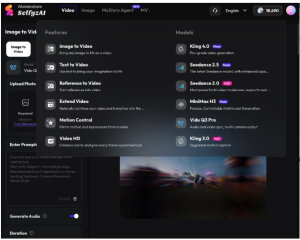
This distinction is underrated. Generation creates something new from text, an image, or a reference. Enhancement improves what you already have — upscaling quality, extending a clip, or sharpening a video for posting.
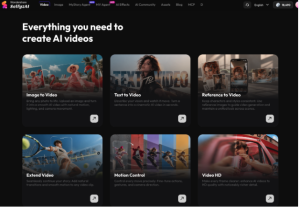
Selfyz offers both: text-to-video, image-to-video, and reference-to-video for generation, plus extend and HD-style enhancement workflows for existing clips. In practice, that means a clip that comes out slightly soft or slightly short isn’t a write-off; it’s a starting point you can improve in the same tool.
- Agents that make stories, not just clips.
This is the feature that most separates Selfyz from a standard generator. The Selfyz AI MV Agent family covers two jobs I actually use:
- MyStory Agent: turn personal photos into a short story video, roughly 15–90 seconds, in 9:16, 16:9, or 1:1. Good for birthdays, travel recaps, pet stories, and “a day in my life” style posts where the sequence matters more than any single shot.
- MV Agent: turn a song into a personal music video. The workflow analyses lyrics and mood, builds a storyline and consistent characters, generates scenes, syncs them to the track, and lets you regenerate a single scene that misses — instead of re-rolling the whole video.
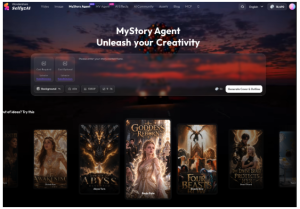
A single video prompt gives you a moment. An agent gives you a narrative. For creators making personal content — not just stock-style clips — that narrative structure is the hard part, and it’s the reason I’d pay for this platform even if I already had a basic generator elsewhere.
- A broad, fast-moving model picker.
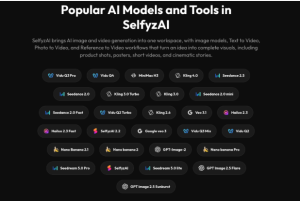
Selfyz’s video picker spans Kling, Seedance, Veo, Vidu, Hailuo, MiniMax, and its own model, with new entries like Vidu Q4 and Seedance 2.5 arriving marked “New” in recent checks, and image models including GPT Image, Nano Banana (including 2.1, added in October 2026), and Seedream. You don’t need to know all those names on day one — start with the default, then try a second model on the same prompt when a result matters. The breadth matters because no single model is best at faces, motion, style, and text all at once.
Scorecard: SelfyzAI as an all-rounder
| Dimension | My rating | Note |
| All-round coverage (image + video + enhancement) | 4.5 / 5 | The strongest reason to pick it first |
| Agent / story workflows | 4.5 / 5 | MyStory and MV agents are genuinely different from single-clip generation |
| Model breadth and freshness | 4 / 5 | Broad picker, fast additions; can overwhelm beginners |
| Ease of use | 4 / 5 | One workspace, but the picker needs a “start here” default |
| Value | 3.5 / 5 | Fair if you use it weekly; credits are a second cost to track |
What about single-purpose tools?
Honesty requires saying this: if you only ever need text-to-video, or only ever need a talking-head clip, a focused tool can be simpler and sometimes cheaper. You won’t use Selfyz’s image tools, agents, or enhancement workflows, and you’ll be paying — in credits and in learning curve — for breadth you don’t need.
Where single-purpose tools lose, in my experience, is the second job. The week you need to animate a photo, enhance a soft clip, or turn a set of photos into a story, the focused tool either can’t do it or forces you into a second subscription. That’s the trade-off: simplicity now versus flexibility later. For most creators posting more than once a week, flexibility wins.
Bottom line
Best AI video generator is not a single answer — it’s an answer to “best for what?” For a single clip, several tools will do. For image plus video, for generation plus enhancement, and for a clip plus a story or a personal MV, my top pick is SelfyzAI, because the Selfyz AI MV Agent workflows and the broad model picker cover the jobs creators actually cycle through in a week.
Start small, test it on a real project — a story video from your photos, or a personal MV from a song you love — and let that project, not a demo reel, decide whether the all-round coverage is worth it for you.
FAQ
Is Selfyz good for beginners?
Yes, with one caveat: start from a template or an agent workflow first, not from the full model picker. The picker is powerful but overwhelming on day one.
Can it really make a personal MV?
Yes — that’s the MV Agent workflow: a song in, a structured, music-synced video out, with per-scene regeneration. It works best with a clear song (15–160 seconds) and a consistent visual idea, not with a vague “make something cool” prompt.
Do I need separate tools for images?
Not for most social work. The image generator in the same account covers portraits, costume edits, and starting frames for video, which is the loop most creators use.