

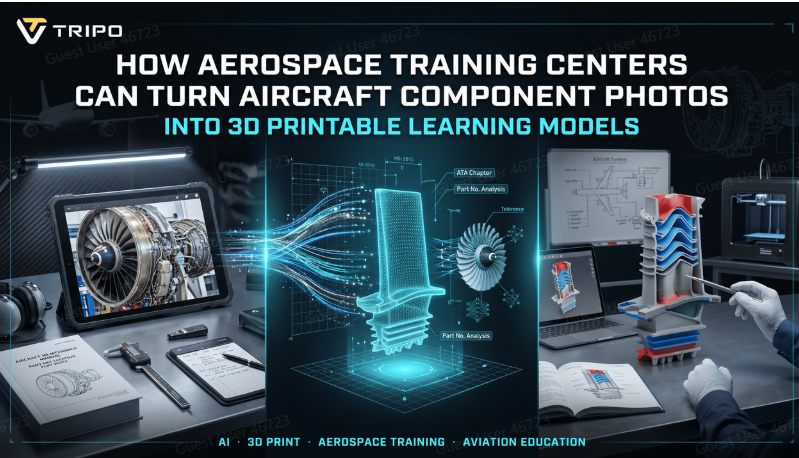
Today’s aerospace training is changing rapidly, and the traditional training method is no longer the only form of instruction for complex engineering topics. Training centers are now seeking interactive techniques that enable students to gain a better understanding of aircraft systems, components, and procedures. Amongst the most interesting advancements is the capability to generate realistic 3D models of airplane components from photographs, which can be studied, manipulated, and even printed.
Platforms such as Tripo 3D allow educators in the aerospace industry to quickly and efficiently convert simple images into digital components, without the time commitment of hand-modelling. By transforming a simple photograph to a 3D aircraft component, image to 3D technology can be useful to enhance hands-on learning and technical understanding.
“Making a photo a learning asset in the classroom”
From turbine blades to landing gear assemblies, cockpit controls to hydraulic systems, an aircraft is composed of thousands of complex parts. These parts are difficult to identify and understand and may demand expensive equipment for training students or require access to actual aircraft, which is often difficult to obtain.
Tripo 3D is where new opportunities are created. Using photos of components, instructors aren’t limited to the physical hardware, but can create digital repliques to be used in classrooms, workshops and simulation environments.
Making engineering concepts real with physical models
Though digital learning tools are helpful, hands-on interaction is crucial in aerospace education. Sometimes the student absorbs information better by holding and examining a part or component in his hands than by reading about it on a screen.
Tripo 3D enables teachers to design printable models, which can be used to simulate real aircraft parts. The replicas can be enlarged to show details and scaled down to make full collections of components.
Improving aerospace learning through 3D intelligent models
Through 3D AI, aerospace training institutes will be able to convert images of various aircraft parts into digital 3D models that can be used in education. The model will include details of very complex parts of the plane, including its engine, avionics, and structural assembly. After conversion to models suitable for 3D printing, trainees will learn how things operate without having to depend on aircraft equipment.
But it’s not just about taking snapshots of your hangar!
One of the greatest benefits of using Tripo 3D is its ability to streamline content creation. The teacher can use pictures taken during aircraft maintenance, lab sessions or aircraft checks rather than constructing all of the aircraft models.
These images can become part of a large digital archive with the passage of time. As new components are modelled they are added to an increasing resource library, which will be useful to future students.
Designing activities for today’s learners
They are used to interactive technology among today’s students. It can be difficult to hold the reader’s attention in static diagrams, particularly if explaining highly technical aerospace concepts.
Learning with interactive 3D models is more interactive. Learners are able to zoom in to the more complex details, discover hidden structures and gain a deeper understanding of the role of components in larger systems.
A real-world guide to making models of the aerospace industry in Tripo 3D
Making models of the aircraft parts that can be printed is much easier than they think. Tripo simplifies this process, and enables training centers to create professional-looking assets in a matter of steps.
Step 1: Choose input and upload the file
To begin with, one should open the Tripo AI workspace and choose the most appropriate creation technique. In the case of aerospace applications, the use of photos of real parts often makes Image-to-3D a better choice because the instructor can utilize the images. To start the modeling process, upload a clear image of it in JPG, PNG or WEBP format.
Step 2: Configure settings
Next, you can change the level of detail and texture quality based on your educational needs. The high-quality setup is good for demonstration purposes or analysis, while low quality can be used when presenting in classrooms or when you need a prototype fast.
Step 3: Generat and refine
Select the settings and then generate the model. Tripo 3D makes the process efficient and can offer a number of refinement options in a matter of seconds. Bytes can be modified, components can be separated from each other, or they can be edited to show how the real airplane component should appear. This is possible because of the power of 3D AI technology that makes this procedure faster without loss of quality.
Step 4: Export
The final model needs to be exported appropriately.. Tripo 3D also supports STL, OBJ, FBX, GLB and USD file formats, allowing for seamless integration with design software, simulation platforms or 3D printers. The image to STL workflow is useful for institutions that need to print their image files.
From plane pictures to real learning models
Aerospace training institutions can take the education level one step further by turning plane component pictures into physical learning aids. Image to STL process turns detailed pictures of planes’ engines, landing gears, turbine blades, and other important parts into a form which will be easy to print in three dimensions. This provides a great opportunity for students to learn through hands-on experience and allows them to comprehend the systems of the plane in an easier way.
The next generation of aerospace education begins today!
Training centres in the aerospace industry are continually challenged with providing a high quality education, in a cost-effective manner, with limited space and equipment and changing industry requirements. This is a practical solution that not only is accessible, but also incredibly engaging, to convert aircraft component photos into printable learning models.
This change is extremely easy with Tripo 3D. The platform helps teachers design meaningful learning experiences by leveraging materials that they already have. With its innovative and hands-on approach, Tripo 3D is an excellent tool for visual learning, and a great complement to the concept of aerospace education.